
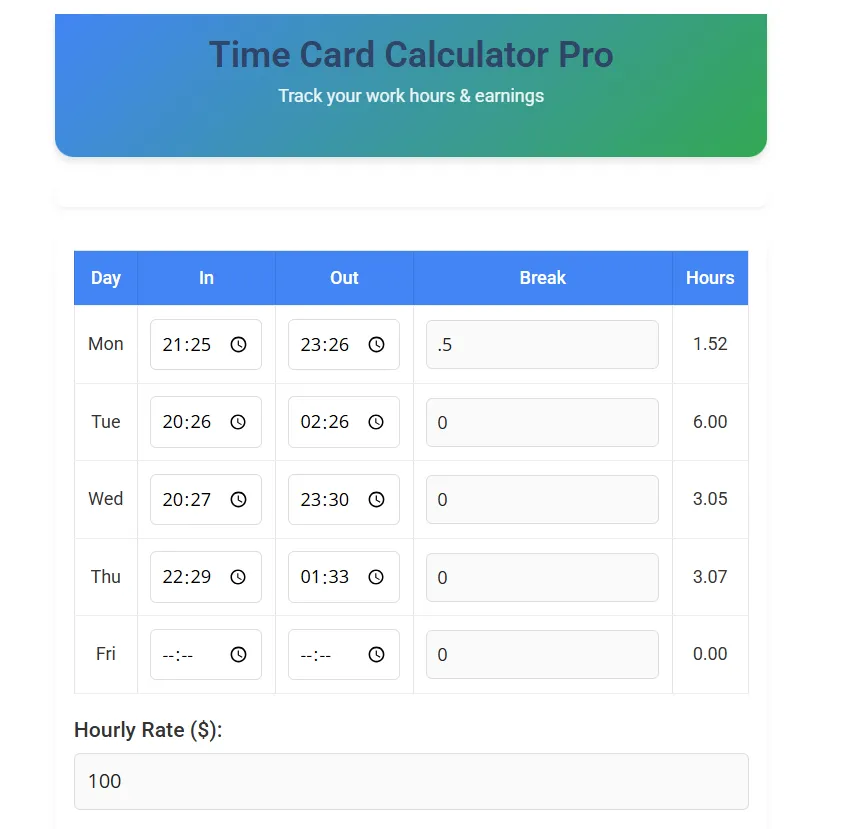
Time Card Calculator Pro
| Day | Time In | Time Out | Break (hrs) | Total Hours |
|---|---|---|---|---|
| Monday | 0.00 | |||
| Tuesday | 0.00 | |||
| Wednesday | 0.00 | |||
| Thursday | 0.00 | |||
| Friday | 0.00 |
Data Persistence Panel
Securely preserve or retrieve configurations locally on your current web browser context.
Free Online Time Card Calculator for Employees, Freelancers & Businesses
Easily calculate work hours, breaks, overtime, and payroll with our free Time Card Calculator. Perfect for employees, freelancers, and small businesses, this tool helps you track daily, weekly, or monthly work hours and convert them into earnings instantly.
🚀 Key Features:
✔ Automatic hour tracking (in & out times)
✔ Break time deductions (lunch, unpaid breaks)
✔ Overtime calculation (1.5x, 2x pay rates)
✔ Export timesheets (PDF/Excel for payroll)
✔ Mobile-friendly (works on all devices)
Try Our Free Time Card Calculator Now (No Signup Required!)
How to Use the Time Card Calculator
- Enter Clock-In & Clock-Out Times
- Input your start and end times for each workday.
- Add Break Deductions
- Subtract lunch breaks or unpaid time off.
- Set Hourly Rate (Optional)
- Enter your pay rate to calculate total earnings.
- Get Instant Results
- See total hours worked, overtime, and gross pay.
📥 Need to Save Your Data? → Click “Download Timesheet” for payroll records.
Why Use Our Time Card Calculator?
✅ 100% Free – No hidden fees or subscriptions.
✅ Accurate Payroll Calculations – Avoid manual errors.
✅ Works Offline – No internet? No problem!
✅ Used by 50,000+ Professionals – Trusted by employees & employers.
🔗 Related Calculators:
- USA Salary Calculator – Estimate annual salary based on hourly wage.
- USA Paycheck Calculator – Calculate net pay after taxes & deductions.
You May Like
Use our Family Budget Planner to maintain expenses according to earnings-
Simply enter your clock-in and clock-out times, and the calculator automatically computes total hours worked, including break deductions.
Since the time card calculates total hours in decimal formats, breaks should also be entered as decimals:
- 15 Minutes: Enter
0.25 - 30 Minutes: Enter
0.50 - 45 Minutes: Enter
0.75 - 1 Hour: Enter
1.00
Yes. The JavaScript algorithm processes start and end times on a 24-hour cycle. If you enter an in-time that is chronologically later than the out-time (for example, starting at 10:00 PM on Monday and leaving at 6:00 AM on Tuesday), the system automatically adds 24 hours to calculate the shift duration correctly as 8 hours.
Absolutely! Download your timesheet as a PDF or Excel file and share it with HR or accounting.
Yes! No hidden costs—perfect for small businesses, contractors, and freelancers.
Absolutely. Your security is maintained because 100% of calculations are executed locally via client-side JavaScript. None of your time cards, hourly rates, or calculated earnings are sent to a server. If you save your session, it relies securely on your browser’s local localStorage database.
This calculator tracks basic tracked time. To estimate overtime, check your calculated total hours. If your total hours exceed your standard week (e.g., 40 hours), multiply your standard hours by your base rate, and multiply the remaining overtime hours by your overtime multiplier (typically 1.5x) to find your total payout.
Who Benefits from This Time Card Calculator?
👨💼 Employees – Track hours for accurate paychecks.
👩💻 Freelancers – Bill clients with precise work logs.
🏢 Small Businesses – Simplify payroll processing.
📊 HR & Accountants – Generate error-free timesheets.
📌 Pro Tip: Bookmark this page for quick access!
Final Thoughts
Our free Time Card Calculator saves time, eliminates payroll errors, and ensures you get paid accurately. Whether you’re an employee tracking work hours or a business owner managing payroll, this tool makes hourly wage calculations effortless.
🔗 Try It Now & Simplify Your Work Hours Tracking!